 Pete Ratkevich
 Case Study: WRAPS
Modernizing Enterprise Web Publishing for Responsive Design & WCAG Accessibility

Background
For more than two decades, Pearson's Web Publishing System (WPS) served as the primary authoring platform for companion study areas, chapter resource portals, and web courseware supporting hundreds of leading higher education textbooks. Built during the desktop-only web era, WPS generated fixed-width, table-heavy HTML with hardcoded inline styling.
As student study habits shifted decisively toward smartphones and tablets, WPS sites suffered from broken layouts, unreadable typography, and failed viewports. More critically, the legacy platform produced severe accessibility barriers: keyboard navigation traps, missing ARIA landmark attributes, and low-contrast color palettes. These defects violated Section 508 and institutional WCAG 2.0/2.1 standards, threatening textbook adoptions at major university systems nationwide.
To eliminate legal exposure and deliver a modern student learning experience, Pearson launched WRAPS (WebDev Responsive Accessible Publishing System). As Product Manager, I guided the end-to-end product transition: defining the mobile-first architecture, engineering accessibility into the core design system, driving author change management, and orchestrating the phased migration and decommissioning of the 20+ year old WPS platform.
Project Overview
WRAPS was engineered to transform how digital content creators, instructional designers, and production specialists author companion learning portals. The initiative replaced bespoke per-page coding with a scalable, component-based publishing engine:
- Mobile-First Responsive Framework: Built on a modern CSS grid/flexbox architecture, ensuring consistent presentation across smartphones, tablets, and desktop displays.
- Accessibility-by-Default Design System: Pre-validated UI components featuring built-in keyboard navigation, ARIA landmarks, screen-reader audio compatibility, and high-contrast modes.
- Metadata-Driven Architecture: Centralized configuration files (
siteinfo.php) driving automated ISBN resolution, cover image retrieval, and dynamic chapter navigation. - Automated Content Transformation Scripts: Custom parsing and refactoring scripts that sanitized dirty legacy HTML into clean, semantic markup.
- Enterprise Change Management & Training: Multi-tiered training curriculum, interactive workshops, and dedicated triage channels supporting authors through the platform transition.
Challenges Faced
1. Over Two Decades of Technical Debt & Unstructured HTML:
Legacy WPS companion sites contained tens of thousands of manually authored HTML pages littered with deprecated font tags, inline style attributes, and rigid layout tables. Migrating this content without human re-authoring required sophisticated regex parsing and automated transformation scripts capable of recognizing content intent while stripping invalid markup.
2. Non-Negotiable Accessibility Standards:
Higher education institutions increasingly mandate strict ADA and WCAG 2.1 AA compliance as a condition of procurement. A single accessibility failure, such as an unlabeled media button or a keyboard trap, could disqualify a multi-million-dollar textbook adoption. Accessibility could not be an afterthought; it had to be programmatically enforced.
3. Author Resistance & Change Fatigue:
Authors and editorial coordinators had used WPS for over twenty years. Shifting from an unrestricted "paste anything" workflow to a structured, component-driven model created initial friction. Overcoming skepticism required empathetic product leadership, demonstrable time savings, and comprehensive onboarding support.
4. In-Flight Semester Continuity:
Hundreds of active university courses were using WPS companion sites concurrently. Migrating live portals had to be executed without link rot, broken asset pointers, or disruption to active student study sessions.
Solutions and Execution
1. Platform Modernization Comparison:
WRAPS fundamentally replaced unstructured legacy authoring with a structured, standards-compliant publishing platform:
| Publishing Dimension | Legacy WPS Platform | Modern WRAPS Platform | Pedagogical & Strategic Value |
|---|---|---|---|
| Device Responsiveness | Fixed 960px desktop layouts; broken viewports and clipped text on mobile screens. | Fluid, mobile-first responsive grid automatically reflowing across all device sizes. | Empowered students to study friction-free across smartphones, tablets, and laptops. |
| Accessibility & Compliance | Manual HTML tagging; frequent keyboard traps, missing alt-text, and low-contrast palettes. | Enforced WCAG 2.1 AA compliance, native screen-reader support, and ARIA landmarks. | 100% audit pass rate; eliminated legal risks and secured institutional textbook adoptions. |
| Content Architecture | Fragmented per-page inline markup; redundant data entry for every chapter asset. | Declarative metadata configuration (siteinfo.php) driving dynamic asset binding. |
Slashed new study area setup time by 60% through automated site generation. |
| Maintenance & Longevity | Fragile legacy dependencies; high regression rates during security updates. | Modular PHP/JSON template engine with centralized, version-controlled components. | Drastically reduced maintenance overhead and eliminated security vulnerabilities. |
2. Architectural Blueprint: Metadata-Driven Site Generation:
Rather than requiring authors to manually code page headers, cover images, and navigation menus for every textbook title, WRAPS decoupled site configuration from presentation:
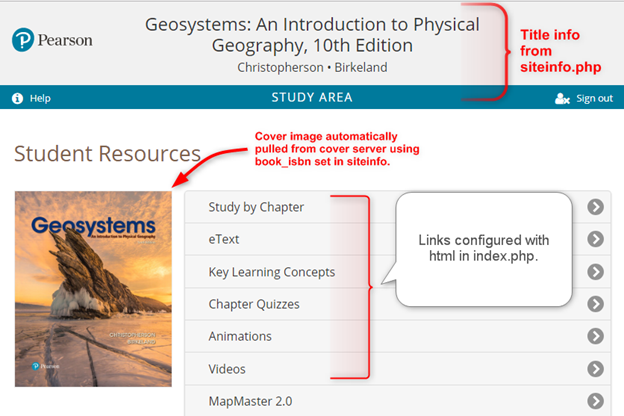
siteinfo.php automatically binds textbook ISBNs, cover images from dedicated media servers, chapter navigation, and media links into a fully responsive, WCAG-compliant student study area.By declaring core textbook parameters once in a structured configuration file, WRAPS automatically fetched optimized cover assets, generated responsive navigation links, and established consistent branding across all chapters, eliminating human error and reducing setup time from days to hours.
3. Phased Migration & Dual-Run Continuity:
To ensure business continuity, we implemented a phased migration strategy:
- Pilot Phase: Migrated non-critical, lower-enrollment companion titles to validate transformation scripts, collect author feedback, and refine the component library.
- Automated Ingestion: Deployed custom batch conversion scripts that extracted raw content assets from WPS databases, sanitized dirty HTML, and reformatted assets into WRAPS JSON manifests.
- Parallel Dual-Run: Maintained legacy WPS in read-only mode while staging WRAPS sites, guaranteeing instant fallback capability during active semester testing.
- Final Decommissioning: Once all active courses completed their academic terms, legacy endpoints were safely redirected, and WPS hardware and databases were permanently sunset.
Outcomes and Business Impact
The transition from WPS to WRAPS modernized Pearson’s web publishing footprint and produced measurable operational gains:
- 100% WCAG 2.1 AA Compliance: Completely eliminated accessibility compliance failures across companion study sites, passing institutional accessibility audits and protecting institutional revenue.
- 60% Reduction in Production Turnaround: Replaced manual per-page HTML construction with structured metadata templates, cutting new title setup time from multiple days to hours.
- Unified Mobile Experience: Delivered a seamless, responsive study experience across smartphones and tablets for millions of higher education students.
- Total Retirement of Legacy Debt: Successfully decommissioned 20+ years of outdated WPS servers, eliminating ongoing maintenance costs, patching overhead, and security liabilities.
- High Cross-Functional Adoption: Trained over 100 authors, editors, and production vendors through structured workshops, achieving high platform satisfaction and self-sufficiency.
Strategic Product Trade-offs
Strict Accessible Component Systems vs. Author Freedom
During the WRAPS rollout, seasoned authors accustomed to the freedom of WPS requested open HTML/CSS fields to implement custom fonts, bespoke colored callouts, and unique table designs. Editorial teams worried that restricting styling freedom would push back against established author expectations.
From a product standpoint, we held a firm line. Permitting unconstrained inline HTML would inevitably recreate the exact failure mode of WPS: broken mobile responsive viewports, contrast failures, and inaccessible keyboard traps that violate institutional WCAG compliance.
Instead, we established a closed, accessible component design system. If an instructional format was needed, our product team designed and pre-certified an accessible component that guaranteed screen-reader compatibility and contrast compliance out of the box. While this required managing initial author pushback through empathetic workshops, it protected institutional compliance and accelerated authoring velocity across the entire catalog.
Lessons Learned
1. Accessibility Must Be Structural, Not an Afterthought:
Attempting to retrofit accessibility onto unstructured HTML is a losing battle. Baking ARIA landmarks, keyboard focus management, and high-contrast styling directly into the core component architecture guarantees compliance without requiring authors to be accessibility experts.
2. Change Management is Core Product Work:
A superior technical platform can still fail if users reject it. Investing in proactive author workshops, comprehensive documentation, and responsive triage channels turned initial legacy skeptics into vocal advocates for WRAPS.
3. Constraints Unleash Velocity:
Restricting authors from manually styling every paragraph did not slow them down; it liberated them. By abstracting styling into structured templates and metadata, authors spent their time focusing on pedagogy and content rather than debugging broken HTML layouts.
4. Automate Content Remediation Early:
Building custom batch-refactoring scripts to parse and clean legacy markup saved hundreds of hours of manual re-keying and ensured that migrated titles adhered strictly to modern semantic standards.
Conclusion
The WRAPS initiative successfully retired over two decades of technical debt, replacing an obsolete publishing system with a modern, mobile-first, and fully accessible digital ecosystem. By uniting user-centered design, automated metadata architecture, and rigorous accessibility standards, the project eliminated institutional compliance risks and accelerated time-to-market.
Leading this transformation reinforced that great product management is about navigating the tension between immediate user habits and long-term strategic integrity, making principled trade-offs that elevate compliance, scalability, and user experience for the entire business.